

CRM-Triggered Direct Mail: HubSpot & Salesforce Workflows for B2B Teams
A practical implementation guide for triggering direct mail from HubSpot or Salesforce: triggers, required fields, frequency caps, QA, and measurement.
Introduction
Introduction: direct mail works best when it’s triggered
The biggest mistake teams make with direct mail is treating it like a one-off campaign.
In high-performing B2B teams, direct mail behaves like a lifecycle channel:
- it’s triggered by signals
- segmented by value and intent
- throttled by frequency caps
- measured with clear attribution assumptions
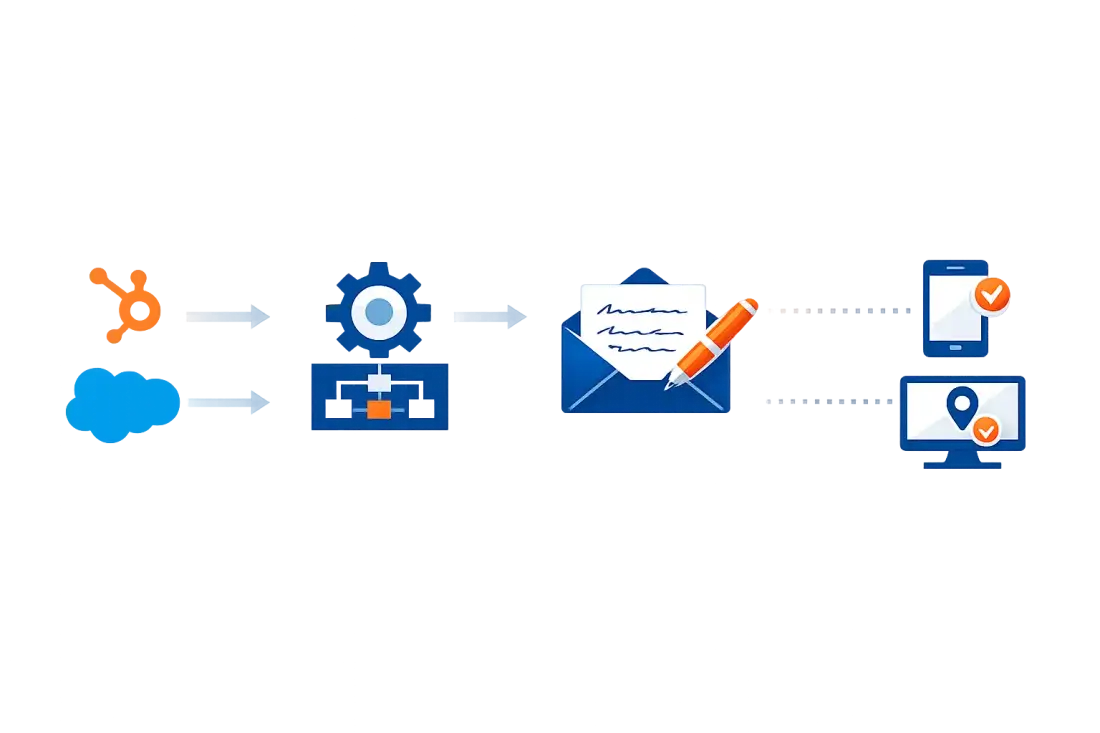
This post shows how to build CRM-triggered direct mail workflows in HubSpot and Salesforce (conceptually—your exact implementation depends on your stack).
If you want the strategy context first, read: Direct Mail for Sales Outreach (B2B): Targeting, Sequencing, and Offers That Work.
Step 1: choose triggers (start with 3)
Pick a small number of high-signal moments.
Good starter triggers:
- demo completed (post-meeting note)
- opportunity stalled (late-stage “unstick” note)
- renewal window opened (retention note)
Optional additional triggers:
- event attendance
- exec sponsor identified
- high-intent account engagement
Step 2: define your segmentation (who qualifies)
Don’t trigger mail on everyone.
Example segmentation rules:
- account tier = Tier 1 or Tier 2
- persona = decision maker, champion, exec sponsor
- region supported for delivery timelines
- address quality = verified
For list quality fundamentals, see: Finding great data for direct mail campaigns.
Step 3: required fields (minimum data model)
At minimum, you need:
- contact name
- company name
- full postal address (with country)
- campaign identifier (what trigger caused this?)
- template variables (what to personalize)
Recommended:
- account tier (1/2/3)
- stage
- owner
- do-not-mail flag (suppression)
- last mail sent date (frequency cap)
Step 3.5: decide how the “send” actually happens
Most teams end up with one of these patterns:
Option A: native integration (best when available)
Your mail provider appears as an action inside your CRM automation tool. Pros: fewer moving parts. Cons: less flexibility if you want custom logic.
Option B: webhook to a lightweight “mail router”
HubSpot/Salesforce triggers an HTTP request to a small service (or serverless function) that:
- validates payload (no missing variables)
- applies routing rules (template by trigger/persona/tier)
- enforces frequency caps
- calls your mail provider
This is the most reliable option when you have multiple triggers and segmentation rules.
Option C: Zapier / Make
Great for quick wins and proof-of-concept workflows, especially for low-volume programs.
If you’re exploring Zapier patterns, this older example shows the shape of a mail-triggered workflow: How to send Scribeless handwritten birthday cards with Zapier.
Step 4: add frequency caps (do this before you scale)
Direct mail feels special because it’s not constant.
Guardrails:
- cap by contact (e.g., 1 per 30 days)
- cap by account (e.g., 2 per quarter)
- cap by trigger type (e.g., renewals allow more touches)
Step 5: create reusable templates + variables
Treat the note like a template with a small “personalization slot.”
Recommended split:
- 70–80% standard
- 20–30% variable
Common variables:
- {{first_name}}
- {{company}}
- {{moment}} (demo, event, milestone)
- {{specific_detail}} (one line)
- {{next_step}}
Personalization guidance: Leveraging Technology: Personalization & Data Driven Campaigns.
HubSpot: example workflow patterns (conceptual)
Pattern A: meeting completed → send note
Trigger: Meeting outcome = completed AND meeting type = demo Filters: tier in (1,2), has valid address, last_mail_sent > 30 days Action: create “mail send” record + send payload to mail provider
Pattern B: opportunity stalled → send “unstick” note
Trigger: deal stage unchanged for 14 days AND deal amount > threshold Filters: not do-not-mail, address present, not already triggered for this deal Action: send, log “mail sent” date, create follow-up task for owner
Pattern C: renewal window open → retention note
Trigger: renewal_date in next 90 days Filters: customer tier in (1,2), champion present Action: send note from CSM, create exec summary task
Salesforce: example workflow patterns (conceptual)
Pattern A: stage change → mail
Trigger: opportunity stage moved to “Evaluation” Filters: amount > threshold, primary contact has verified address Action: queue mail send + create task to follow up after delivery window
Pattern B: stalled opp → exec sponsor note
Trigger: opp “Days in stage” > limit AND tier = 1 Filters: exec sponsor identified Action: generate exec sponsor note template + send
QA and safety checks (non-negotiable)
Before sending:
- validate missing variables (no “Hi ,”)
- verify address format and country
- ensure message passes the “receipt test” (no creepy personalization)
- ensure suppression lists are respected
Instrumentation: log sends like an event stream
Minimum tracking events:
- mail_queued
- mail_sent
- mail_delivered_estimated (optional)
- qr_scanned / landing_page_visited (if applicable)
Also log in CRM:
- mail_touch_date
- mail_campaign_id
- mail_template_id
For measurement mechanics, see: How to track direct mail marketing campaigns.
Conclusion
CRM-triggered direct mail works when it’s treated like a real lifecycle channel:
- signal-based triggers
- tight segmentation
- strong QA
- frequency caps
- measurement built-in
Want help implementing a triggered direct mail program in your CRM? Book a campaign consult


